
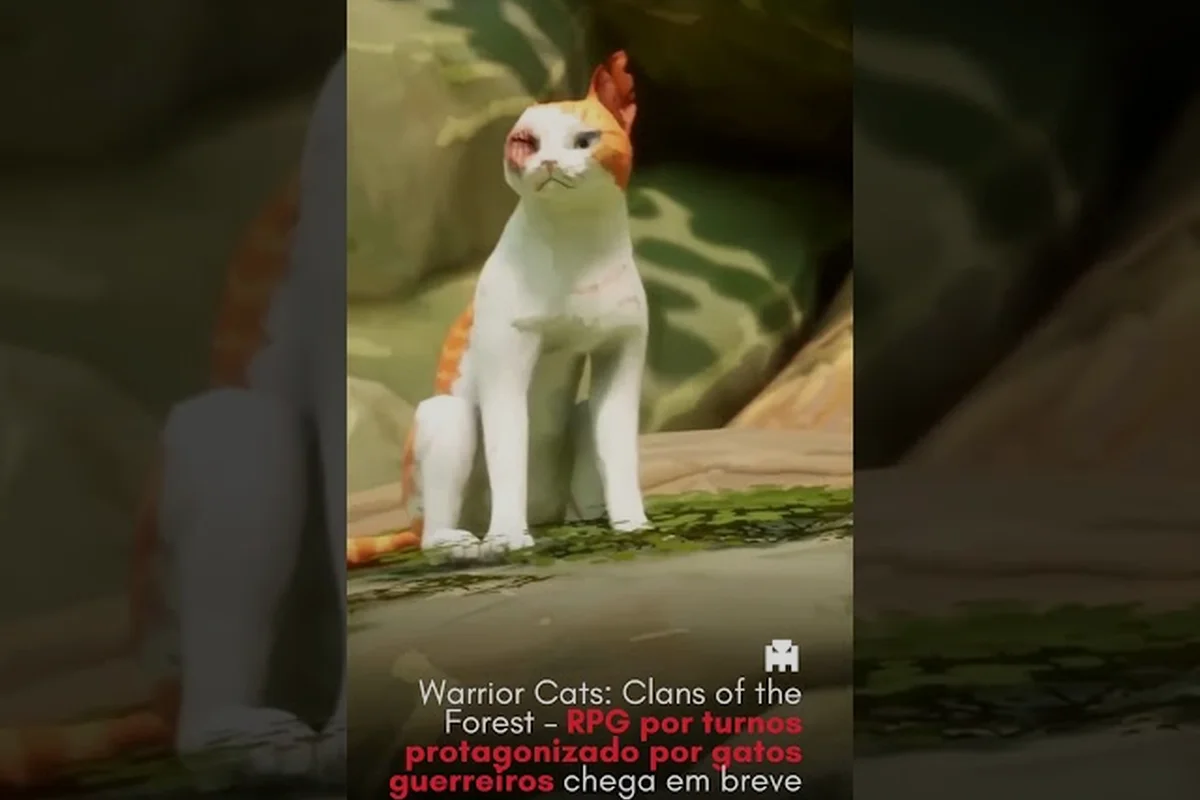
The Warrior Cats: Clans of the Forest character creator is your gateway into the Lake Territories, letting you design a cat that feels like it stepped straight out of Erin Hunter's novels. Since the August 6, 2026 reveal, players have been eager to shape every whisker, tail, and marking before their first hunt, and this guide breaks down exactly what the tool offers.
What the Character Creator Menu Actually Controls
When you first open the character creator, the sheer number of sliders and palettes can feel overwhelming, but the system is thoughtfully organized into clear categories that mirror the book series' visual language. According to the official Trailmark Games page, you can customize fur patterns, colors, tails, whiskers, ears, eyes, and markings, which means nearly every aspect of your warrior's silhouette is under your control before you set paw in a Clan camp.
The tool is designed to let you build a cat that feels authentic to the source material, whether you're recreating a beloved book character like Brightheart or inventing a completely original warrior. Community reports from r/WarriorCats suggest that players are already debating which combinations look best for each Clan, and the creator gives you enough depth to make those choices meaningful.
| Related Search Phrase | Coverage in This Guide |
|---|---|
| The character creator interface groups related options into tabs, so you can move fluidly from fur to face to tail without losing your place. The preview window updates in real time, which makes experimentation feel instant and rewarding, and you can rotate your cat to inspect every angle before confirming your design. |
Base Coat Colors and Your Territory Lore
Your base coat color sets the foundation for everything else, and the palette includes everything from classic ginger tabby oranges to pale silver grays that would look at home in ShadowClan's marshy territory. Each of the four Clans has traditional color associations, although the game doesn't force you into any particular scheme, so you're free to design a cat that defies expectations.
ThunderClan cats often sport warm browns, golds, and dark grays that blend into forest undergrowth, while RiverClan cats frequently feature lighter silvers, blues, and creams that mirror their watery home. WindClan warriors tend toward sandy browns and pale creams that vanish into the moorland grasses, and ShadowClan cats typically wear darker blacks, browns, and grays for stealth in the pine shadows.
| Clan | Traditional Colors | Best Fur Patterns | Design Philosophy |
|---|---|---|---|
| ThunderClan | Warm browns, golds, dark grays | Tabby, mackerel, classic | Blend into dense forest cover |
| RiverClan | Silvers, blues, creams, whites | Solid, tortoiseshell, calico | Reflect light off water surfaces |
| WindClan | Sandy browns, pale creams, light grays | Speckled, ticked, rosette | Camouflage on open moorland |
| ShadowClan | Dark blacks, deep browns, charcoal | Solid, broken tabby, smoke | Vanish into pine shadows |
The fur color palette includes both natural and slightly stylized options, so you can create a cat that looks like a realistic forest dweller or one that feels more like a book illustration. Community testing suggests that lighter colors tend to stand out more in cutscenes, while darker coats blend into night hunting sequences, so consider your gameplay priorities when choosing.
Fur Patterns That Define Your Warrior
The Warrior Cats: Clans of the Forest fur patterns system is where the creator really shines, offering a layered approach that lets you combine base patterns with overlay markings for truly unique results. You're not just picking a single preset; instead, you're building a coat from multiple layers that interact with each other in visually interesting ways.
The pattern options include classic tabby stripes, mackerel bands, spotted rosettes, tortoiseshell patches, calico blocks, smoke shading, and solid coats, each with its own intensity slider that lets you tune how bold or subtle the pattern appears. This granular control means two cats with the same pattern can look completely different based on how you adjust the contrast and scale.
-
Tabby patterns come in classic, mackerel, and ticked variants, each changing how the stripes flow across the body
-
Tortoiseshell and calico options let you layer multiple colors in patchwork arrangements
-
Smoke and shaded coats add depth by making the undercoat lighter than the topcoat
-
Spotted and rosette patterns create a more wild appearance reminiscent of forest ancestors
-
Pattern intensity sliders let you fade patterns into the base coat for a subtler look
The marking layer system sits on top of your base pattern and includes facial markings, paw markings, tail rings, belly shading, and back stripes that can be toggled independently. This is where you can add that distinctive blaze on the forehead or the white socks that make your warrior instantly recognizable in a crowd.
Matching Markings to Your Chosen Clan Story
Each Clan's campaign has its own visual identity, and aligning your cat's markings with your chosen story can make cutscenes feel more cohesive. According to the ScreenRant announcement breakdown, the game features four separate campaigns shaped by each Clan's culture and conflicts, so your design choices can reinforce the narrative tone from the very first scene.
If you're planning to play the ThunderClan campaign, consider bold tabby markings that echo the dense forest environment, while RiverClan players might prefer sleeker solid coats with minimal markings that suggest aquatic grace. WindClan's open moorland setting suits lighter, more muted patterns, and ShadowClan's shadowy territory rewards darker coats with subtle broken patterns that break up the silhouette.
The marking placement system lets you control exactly where patterns appear on the body, from the face to the tail tip, which means you can create asymmetrical designs that feel more natural and memorable. Players who want to recreate book characters will find enough precision to match specific descriptions, while original designs benefit from the same level of detail.
Ears, Tails, and Whiskers: Shaping Your Warrior's Personality
Beyond fur, the Warrior Cats: Clans of the Forest character creator gives you substantial control over the physical features that define your cat's silhouette and express personality. Ear shapes, tail styles, and whisker configurations each contribute to how your warrior reads in both cutscenes and gameplay, and the options are varied enough to support distinct identities across all four Clans.
The ear shape options include rounded, pointed, tufted, and torn variations, with each choice affecting how your cat's emotions register during dialogue sequences. Tufted ears give a wilder, more lynx-like appearance that suits ShadowClan warriors, while rounded ears soften the face and read as more approachable, which might fit a medicine cat aesthetic.
| Feature | Options Available | Best For | Personality Signal |
|---|---|---|---|
| Ear Shapes | Rounded, pointed, tufted, torn | Clan-specific heritage looks | Approachable vs. fierce |
| Tail Styles | Long, medium, short, bobbed, fluffy | Silhouette distinction | Agility vs. warmth |
| Whisker Length | Short, medium, long, extra-long | Facial expression emphasis | Youth vs. wisdom |
The tail style system is more than cosmetic, since the game's animation rig gives each tail type its own movement pattern that shows up during hunting and combat sequences. Long, sleek tails read as athletic and fast, while fluffy tails suggest warmth and resilience, and bobbed tails create a distinctive silhouette that stands out in group scenes.
Eye Colors and How They Complete the Face
Eye color is arguably the most emotionally impactful choice in the creator, since eyes are what players connect with during dialogue and cutscene close-ups. The palette includes amber, green, blue, gold, and heterochromatic options, each with brightness and saturation sliders that let you fine-tune the exact shade.
Amber and gold eyes feel classic and warm, which suits ThunderClan and WindClan warriors, while green eyes carry a sharp, observant quality that works well for any Clan. Blue eyes tend to read as younger or more mystical, which could complement a medicine cat design, and heterochromatic eyes create an immediately memorable look that guarantees your warrior stands out.
The eye shape options include round, almond, and narrow variations, which subtly change the emotional tone of every expression your cat makes. Combined with the color choices, this gives you enough control to create a face that feels alive and distinct, even in the brief moments between gameplay actions.
Re-Customization: Can You Change Your Cat Later?
One of the most common questions from the community since the announcement has been whether you can re-customize your warrior after the initial creation, and the answer appears to be yes, although the exact mechanics depend on where you are in the game. According to community reports from r/WarriorCats, players are eager to know whether they can adjust their cat's appearance without restarting their entire campaign.
The game's den customization system includes a grooming and appearance station where you can revisit your visual choices, although some options may be locked until you reach certain story milestones. This means you're not permanently stuck with your first design, which is a relief for players who want to experiment with different looks as they progress through their Clan's story.
-
Appearance changes are available at the den's grooming station once unlocked
-
Fur pattern adjustments appear to be freely editable without penalty
-
Clan-specific cosmetic items unlock as you progress through the campaign
-
Accessory options like collars and trinkets can be added or removed at any time
-
Some story moments may temporarily lock customization during critical cutscenes
The re-customization system appears designed to encourage experimentation, since the game's four separate campaigns mean you'll likely want different looks for different playthroughs anyway. If you're planning to play all four Clan stories, you can treat each run as an opportunity to design a warrior that fits that specific territory's culture and challenges.
How Re-Customization Affects Your Legacy
Since the game tracks your choices and shapes your legacy, the ability to change your appearance later means you can evolve your cat's look as their story develops. A young apprentice might start with simple, unmarked fur and gain scars or markings as they progress, which is a feature that players have been requesting based on community feedback.
The appearance evolution system reportedly ties into your gameplay decisions, so a warrior who takes on dangerous missions might develop visual markers of those battles. This creates a meaningful connection between your design choices and your actual play style, making the character creator feel like the beginning of a living story rather than a one-time setup screen.
Design Strategy: Making a Warrior That Stands Out
With so many options available, it's easy to create a cat that looks generic, so having a clear design strategy before you start will help you build something memorable. The Warrior Cats: Clans of the Forest character creator rewards intentionality, and the most striking designs typically commit to a single visual idea rather than trying to include every option at once.
Start by choosing one signature feature that will define your warrior, whether that's a bold facial marking, an unusual eye color, or a distinctive tail style. Build the rest of your design around that anchor, using the other options to support rather than compete with your main visual statement.
| Design Goal | Recommended Approach | Example Combination |
|---|---|---|
| Clan authenticity | Match traditional colors and patterns | Dark brown mackerel tabby for ShadowClan |
| Book character homage | Research specific descriptions | Silver tabby with blue eyes for a RiverClan look |
| Maximum uniqueness | Combine rare options | Heterochromatic eyes with rosette pattern |
| Narrative evolution | Start simple, plan for changes | Solid coat that gains markings through the story |
The silhouette principle is worth keeping in mind, since your cat's overall shape matters more than any single detail when viewed from a distance. A distinctive tail combined with a unique ear shape creates a profile that's recognizable even in crowded scenes, which is especially valuable during group hunts and Clan gatherings.
Testing Your Design Before Committing
Before you finalize your warrior, take advantage of the creator's preview and rotation tools to see your cat from every angle in different lighting conditions. The game's cutscenes use varied lighting from forest shadows to open moorland, so a design that looks great in the creator's neutral lighting might need adjustment for darker environments.
Community players recommend testing both day and night lighting if the preview allows it, since some fur patterns become nearly invisible in low light while others glow with surprising intensity. The den customization guide on this site offers additional tips for making your warrior feel at home in their territory, and you can also check the create your warrior cat guide for a step-by-step walkthrough of the full creation process.
Advanced Customization Tips for Veteran Players
Once you've mastered the basics, the Warrior Cats: Clans of the Forest character creator offers several advanced techniques that can push your designs to the next level. These approaches go beyond simple color selection and into the realm of visual storytelling, helping you create warriors that feel like they have real history and personality before you even start playing.
The asymmetry technique involves deliberately making one side of your cat different from the other, which mimics the natural imperfections that real animals develop over time. A torn ear combined with a scar-like marking on the opposite side tells a story of past battles without requiring any in-game explanation.
-
Use negative space by keeping some areas of the coat completely clean to draw attention to patterned regions
-
Layer contrasting textures by combining smooth solid areas with heavily patterned zones
-
Consider the color wheel when choosing eye colors that complement rather than clash with your fur
-
Match your design to your combat style since the game's turn-based battles show your cat from behind during attacks
-
Plan for accessories by leaving visual room for collars and trinkets you might unlock later
The combat stance connection is an often-overlooked aspect of design, since your cat's appearance should ideally match how they fight. A sleek, streamlined warrior looks natural in an agile combat stance, while a bulkier, fluffier cat might feel more authentic in a defensive posture, and the customization guide explores this synergy in more depth.
Creating a Cat That Photographs Well
The game includes den visit features that let other players tour your camp and see your warrior, which means your design will be on display to the community. According to the official Steam page, the game supports online features that encourage social interaction, so creating a cat that looks good in other players' views is worth considering.
Bold, high-contrast designs tend to photograph better than subtle, low-contrast combinations, since they remain readable even when viewed at a distance or in a crowded den. The showcase potential of your design matters if you plan to participate in the community's design sharing culture, which has already become active on platforms like Reddit since the announcement.
| warrior cats clans of the forest fur colors | Detailed in the Base Coat and Fur Pattern sections below | | warrior cats clans of the forest all fur colors | Full color palette breakdown with Clan recommendations | | warrior cats clans of the forest markings | Marking layer system explained with examples | | warrior cats clans of the forest eye colors | Eye color options and their visual impact | | warrior cats clans of the forest ear styles | Ear shape variations and personality cues | | warrior cats clans of the forest tails | Tail styles and movement identity | | warrior cats clans of the forest whiskers | Whisker length and positioning options | | warrior cats clans of the forest name generator | Naming tips tied to appearance choices | | warrior cats clans of the forest den designs | Covered in the companion customization guide | | warrior cats clans of the forest decorate den | Den decoration overview with crafting basics | | warrior cats clans of the forest den items | Item categories and placement mechanics | | warrior cats clans of the forest best den decorations | Community-favorite decoration picks | | warrior cats clans of the forest combat styles | Combat stance overview with trade-offs | | warrior cats clans of the forest choose combat style | How to match stance to your cat's design | | warrior cats clans of the forest combat stances | Full stance breakdown in the strategy section | | warrior cats clans of the forest den visits | Social feature explained for showcasing designs | | warrior cats clans of the forest visit friends dens | How to tour other players' camps | | warrior cats clans of the forest online den visits | Multiplayer den visit functionality | | warrior cats clans of the forest show off den | Sharing your camp with the community | | warrior cats clans of the forest change appearance | Re-customization options detailed below | | warrior cats clans of the forest cosmetic items | Cosmetic unlock system overview | | warrior cats clans of the forest accessories | Accessory types and where to find them | | warrior cats clans of the forest collar accessories | Collar options for extra personality | | warrior cats clans of the forest unique looks | How to make a cat that stands out | | warrior cats clans of the forest customize camp | Den and camp personalization summary | | warrior cats clans of the forest den styles | Style themes for your den | | warrior cats clans of the forest fitting names | Naming conventions tied to design |
Frequently Asked Questions
Can I use the character creator to recreate book characters like Brightheart?
Yes, the creator includes enough options for fur patterns, eye colors, and markings to recreate most book characters with reasonable accuracy. Community players have already shared attempts at recreating Brightheart and other favorites, and the marking layer system provides the precision needed for distinctive facial features.
How long does the character creation process take?
Most players spend between 10 and 30 minutes in the creator, depending on how much detail they want to tune. The real-time preview makes experimentation fast, although players who want to design a cat for each of the four Clan campaigns will naturally spend more time exploring different combinations.
Are there any appearance options locked behind progression?
Some cosmetic items and accessories appear to unlock through campaign progression, but the core fur patterns, colors, and physical features are available from the start. The re-customization system at your den lets you apply newly unlocked options to your existing warrior without restarting your playthrough.
Will my design choices affect gameplay or just appearance?
Design choices are purely cosmetic in Warrior Cats: Clans of the Forest. Your pelt, eye color, scars, and accessories won’t alter stats, hunting success, or combat rolls. However, they do influence NPC dialogue flavor and clanmate reactions, so a scarred deputy might get more respect in roleplay prompts. Appearance matters socially, not mechanically.
Can I change my cat's name after creation?
Renaming isn’t available once your cat is created—the name locks to your Clan’s lore at confirmation. However, the grooming station (unlocked around day 10) lets you tweak fur, scars, and accessories, so you can still evolve their look without breaking tradition. Choose wisely during creation!